GCMOB APK

Learn everything about the gCMOB app, including features, gCMOB CCTV camera setup, login, safety, pros, cons, download process .
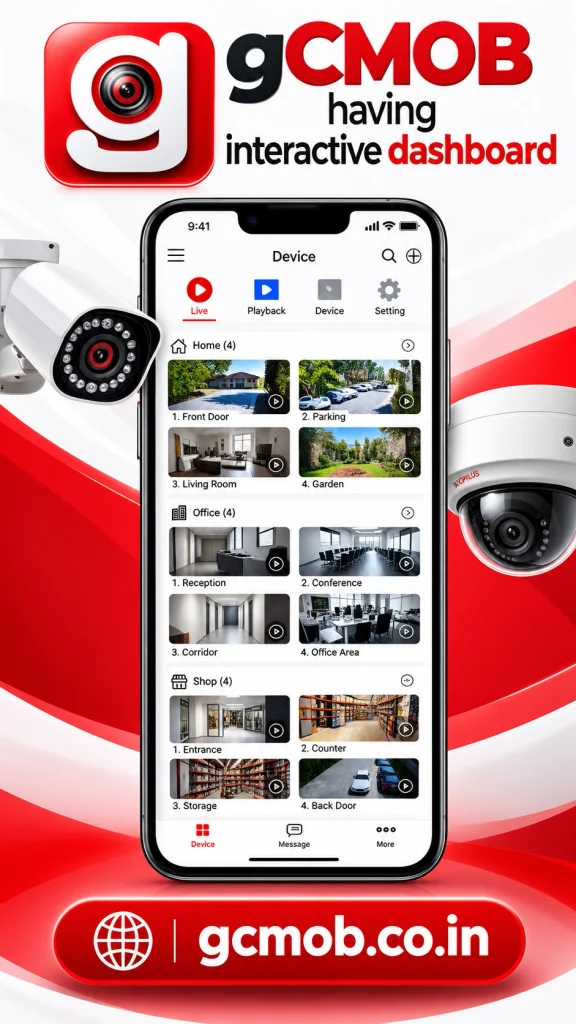
gCMOB APK: Complete Guide to the gCMOB App for CCTV Camera Monitoring
Home security cameras are found everywhere in homes, offices, shops, warehouses, schools and many other places. But putting a CCTV camera is just one part of the whole setup of the security system. And people also want a simple way to see their cameras when they’re away from the property. And this is where the gCMOB app comes in.
The gCMOB app only works with remote CCTV cameras. It enables you to connect supported cameras, DVRs, NVRs, and other surveillance devices to the mobile app. With the system properly connected, users can view live video or recorded video footage, control any compatible cameras and get key alerts from virtually anywhere.
That is because users are looking for the gCMOB APK to install on Android devices. Other people who look for gCMOB CCTV camera software already have a compatible security system.
GCMOB is a live video monitoring and control application for cameras and video encoders, as described in the official Google Play listing. The capabilities it supports now include live view, playback, PTZ controls, QR code device adding and push notification as well as two-way talk capability, remote configuration settings, digital zoom and device health information.
In this ultimate guide, we will discuss what gCMOB is, how the gCMOB APK works, its key features, camera support, the download process, login system, account setup guide and much more.
What Is gCMOB?
gCMOB is a mobile surveillance application that enables the user to view and manage CCTV systems that are compatible with using a Smartphone or Tablet. The application is published on Google Play by Aditya Infotech Ltd and basically interfaces with CP PLUS observation hardware.
The gCMOB app is straightforward with a basic purpose. This allows you to access your CCTV system remotely.
Allow me to give you an example say you installed security cameras in your shop. Typically, you would view those cameras on a TV or monitor connected to your DVR/NVR. But the monitor is not visible after you exit the shop.
Once you connect the gCMOB mobile app to your recorder, your phone can serve as an additional monitor for your security system. Assuming that the necessary devices and settings with respect to the network connection and remote access are correct, you can open the application and check supported cameras.
This will be useful in that it allows you to use the gCMOB app for people who cannot really stay with the CCTV monitor for hours on end.
What Is gCMOB APK?
It is Android software and you can refer to the gCMOB APK file as downloading the gCMOB app normally.
APK means Android Package Kit. APK files are used to install applications on Android devices. Android takes the reins of the installation package when gCMOB is installed directly from Google Play. Normally, there is no need to download an APK file manually.
Google Play is not available for certain users; therefore some search for the gCMOB APK. Some might want to find the app installation file because they need it for manual installation.
You should prefer the version available on Google Play. If you download gCMOB APK files from websites of unknown origin, you might end up with modified, older or unsafe versions of the APK. This is especially crucial because a CCTV surveillance program potentially has access to sensitive security information. Utilizing an inappropriate application from a third-party source bring unnecessary privacy and security threats.
Installation of the official gCMOB app from Google Play is the simplest, safest and most convenient way for the vast majority of Android users.
How Does the gCMOB App Work?
gCMOB app connects your mobile device with full support for surveillance equipment. Your CCTV cameras are connected directly or via a device such as a DVR or NVR. The recorder handles camera connections and typically writes video files to a hard disk.
Configuring remote access enables the gCMOB APK to communicate with your supported device via your network connection. Once you add the device to the app, available cameras start showing up inside the live-view area of it. You pick a camera and then are able to watch the video on your phone.
For some robust equipment and configuration, you may also search for previous recordings, apply zoom in a live video feed, control a PTZ camera, listen to audio playback from the ambient sound source during recording and speak through supported two-way audio devices or change some settings of other devices.
For CP PLUS DVRs, NVRs and IP cameras with InstaOn instant cloud viewing supported by the app. Scan the QR code to simplify the device addition process. The specific options you see depend on the model of your camera, recorder, firmware version, network configuration and what permissions are given to the user account.
Features of gCMOB APK
gCMOB CCTV Camera Monitoring
CCTV monitoring is the foremost reason for people to install the gCMOB app. Setting up the gCMOB CCTV camera can allow you to check on your property even when you are far away from it.
Suppose you own a small shop. Near the entrance, you might have one camera; at the cash counter another camera; and then more cameras over the storage or customer area. Rather than having to go back to the store every time you want to check something, you can see what cameras are available remotely using your mobile device.
It is useful for business owners managing separate areas of their workplace. Security staff will also not need to remain in front of the main recorder, but they can still take advantage of viewing camera feeds.
However, the gCMOB CCTV camera system is best when remote monitoring matters to you.
Live Camera Viewing
The most significant function of gCMOB is its live viewing. Once your CCTV device is successfully added, you will be able to open the application and see live camera feeds. This allows you to see what is taking place at that location in real time.
According to its own app details gCMOB comes with flexible configurable live-preview layouts of up to sixteen views. How many cameras you can view at once on a small mobile screen could lead to a situation in which each video window is too tiny. In this case, one can open the camera that is of utmost importance and view it in a larger window.
Another feature of the app is sliding between various camera groups which makes navigation convenient when a lot of channels have been connected.
Video Playback
Live video describes what happens at this moment. Playback assists you with reviewing what has occurred. The gCMOB allows you to play back recorded video from compatible surveillance systems. You may be interested in when someone came to your store. So just have a look at what has happened close to your gate the previous night. A business owner might need to comment on a past occurrence. Homeowners could check footage of their property after receiving an alert
Instead of standing beside the DVR or NVR, you can be sitting 100m away from it and watch recorded footage via the gCMOB app. Many factors (recorder, storage, internet connection, mobile carrier and network settings) can heavily affect playback performance.
Digital Zoom
Normal camera view doesn’t capture enough details at times. Digital zoom on live video in the gCMOB app. Digital zoom is the cropping of a portion of the video’s area displayed on your screen.
Like, you would probably want to capture an entrance, object, vehicle, doorway, etc. Digital zoom does not pull out information that the camera itself never even captured in the first place. However, if the initial image is low resolution enhancing it will make the image less clear.
PTZ Camera Controls
Certain CCTV cameras have physical mobility. We call these kinds of cameras the so-called PTZ cameras which support pan, tilt and zoom. Pan typically refers to the side-to-side movement of a camera view. Tilt is when you raise or lower it. Supported optical systems can zoom into a local point from distant areas.
The gCMOB app provides support for PTZ control on equipment that offers this feature.
For instance, a PTZ camera that is mounted outside the entrance of a warehouse would usually be looking directly at the entrance. If an event occurs near another location on the property, an authorized user can move the camera from the phone itself.
Push Notifications
A security application is less useful if you have to check the screen every minute. Push notifications are supported by the gCMOB app. Notifications allow alerts from supported systems to your mobile device.
This, however, is entirely dependent on the CCTV equipment you have access to and how your surveillance system has been configured.
But notifications should be configured accordingly by the users. If there are too many alerts when not needed, this can cause distraction and if the alert setting is misconfigured, important notifications may be missed at times.
QR Code Device Setup
A CCTV recorder manual connection may confuse some users who are not very familiar with this process. Basic Device Information, Network Settings, Usernames and Passwords (if required), Serial Number or any other settings. You can add devices that are supported simply by scanning the QR code from the gCMOB app.
If you have QR code scanners somewhere in the application, then instead of typing a long device identifier manually, simply scan and let the app read the necessary device information itself.
We still need to ensure security; thus, QR codes do not remove this gap. Keep your CCTV login details a secret, and do not allow people access to your devices that don’t require it.
Two-Way Talk
In addition, the gCMOB app supports two-way talk via compatible equipment. Audio is two-way audio whenever the connected device can handle that feature.
This is very useful with compatible door access systems, video door phones, workplace surveillance cameras and other security devices that have a mic and speaker. This feature relies on hardware support. Installing gCMOB will not provide you with two-way audio functionality if it is not supported by your camera or recorder.
Video Door Phone Support
gCMOB can also perform video door phone functionality with supported devices.
Once again, the functionality is dependent on what model and configuration you have on the connected equipment.
Picture in Picture
Another gCMOB feature supported is Picture in Picture, commonly known as PIP. Instead of operating the whole app across your entire screen, a compatible device may be able to keep that video visible in a smaller window while you do other things.
This is helpful when you want to monitor a camera from your phone but need some other portion of it at the same time.
Camera Favorites
When you have a large number of CCTV cameras, many times you use some cameras more than others. . The owner may only care about entrance and cash counter camera in the hours of operation.
Main Stream and Sub Stream
The quality of video affects both image clarity and the use of your internet. Higher fidelity streams typically require additional data and have higher network performance requirements. Lower-quality streams can help with faster load time potential, and less usage of bandwidth.
Pros and Cons of gCMOB APK
Pros of gCMOB
One of the strong points about gCMOB is ease of use. It means you can access eligible cameras from your mobile device instead of being physically next to a CCTV monitor.
The app also does more than just live views. These include playback, PTZ control, digital zoom, alerts, device health information, QR code setup, two-way talk support for video door phone cameras, multiple camera viewing and remote configuration providing a more holistic CCTV management engine.
Secondly it can benefit from providing large-scale camera systems. For instance, if you have the ability to do more than just show a few live channels and you move from camera groups, it can help business owners and security staff to oversee surveillance.
This also acts as a tool where users may not have desired internet to access the main stream, and can switch between main and sub streams.
Cons of gCMOB
There is no perfect CCTV application in the world, and gCMOB also has its cons. The main issue is that performance relies on a multitude of different factors. Network settings may be incorrect. A device may go offline. Even the mobile application itself may be buggy after an update.
Some users reported that their connection fails, playback is hard to do on Google Play reviews these days, or the camera takes a while to load because a particular internet connection cannot access it. Other reviews highlight users’ appreciation for the app but desire for a better playback interface.
The first device is often the most challenging element for novices because there are plenty of terms related to a video surveillance system, such as DVR, NVR, IP address, stream, channel, serial number, PTZ and device password.

FAQs
Conclusion
The gCMOB app is a simple mobile CCTV monitor for users of compatible monitoring equipment. The primary purpose is also quite simple: it allows you to access your CCTV camera when not connected to the recorder.
The app is not just for simple live viewing. Playback, PTZ Camera Control, Digital Zoom, Push Notifications, QR Code Device Setup and Two-way Talk Video Door Phone Support is some of the features in your phone to ensure good control from a smartphone with the advantage of device health monitoring lots of images online, viewing favorite cameras (up to 4), multiple views live at the same time and Picture in Picture as well as Remote Configuration.
It can simplify property checks for home users. This has also helped shop and business owners get easy access to critical security cameras even when away from their property. Also, remote access helps security teams and people with bigger CCTV APK systems.